App Store Custom Product Pages: the definitive guide (2026)

We got 2.9× App Store conversion from a custom product page. One of ours also did 0.5×. Both numbers are real, both came from the same app (Attached), and the distance between them is what this guide is about.
Custom Product Pages (CPPs) are extra versions of your App Store listing, each with its own URL. Everyone links Apple's marketing page and stops there. This is the rest: the hard limits, where the pages can actually appear, what results Apple and we have measured, how to build one in an afternoon, and how to catch the failure mode nobody advertises.
Link to this headingThe facts, in one table
Link to this headingWhere a CPP can actually appear
Five surfaces, and most apps use one:
- Direct links you control — your website, email, social bios, QR codes. The workhorse. This is where our 2.9× lives.
- Apple Ads — search results ad variations, Search tab ads, Today tab ads can each point at a CPP.
- App Store search — if you assign keywords to the page, it appears in results for those keywords instead of your default page. Keyword combinations must be unique across pages, and the intent has to match or you're routing strangers to a page built for someone else.
- Editorial — CPPs can appear in curated stories on the Today, Games, and Apps tabs.
- Third-party ad networks — StoreKit-rendered ads can target a CPP by ID (
customProductPageIdentifieron SKOverlay or SKStoreProductViewController).
Link to this headingWhat results to expect
Apple's own published numbers: referring traffic to a custom product page lifts conversion by 2.5 percentage points on average, against a 1.6% average default-page conversion rate — a 156% relative increase. Their case studies run in the same direction: CBS Sports saw +20% conversion from a March Madness page, and State of Survival saw +33% conversion with 14% lower cost per install.
Our data agrees, with one addition nobody advertises: the distribution has a left tail.
Our page for post-quiz visitors converts at 2.9× our default baseline. A second intent-matched page does 2.4×. And a page we aimed at breakup-related blog readers converted at 0.5× — half the default listing. Routing traffic there was worse than doing nothing, and Apple's dashboard raised no flag. Mismatched pages don't just underdeliver; they cost you installs you would otherwise have gotten.
Link to this headingMeasure yours before building more
Apple's "conversion rate" column uses its own denominator and won't reconcile with anything you compute. Derive your own baseline instead:
default baseline = (total downloads − CPP downloads)
                 ÷ (total page views − CPP views)
Divide each page's downloads by its views and compare. Anything under 1× is actively losing installs; reroute that traffic today. App Analytics also shows retention and proceeds per paying user for each page, which matters because a soft-promise page can lift installs and quietly halve day-7 retention. Check both.
Link to this headingMatch the page to the moment
Your default listing speaks to everyone. A custom page gets to continue a single thought:
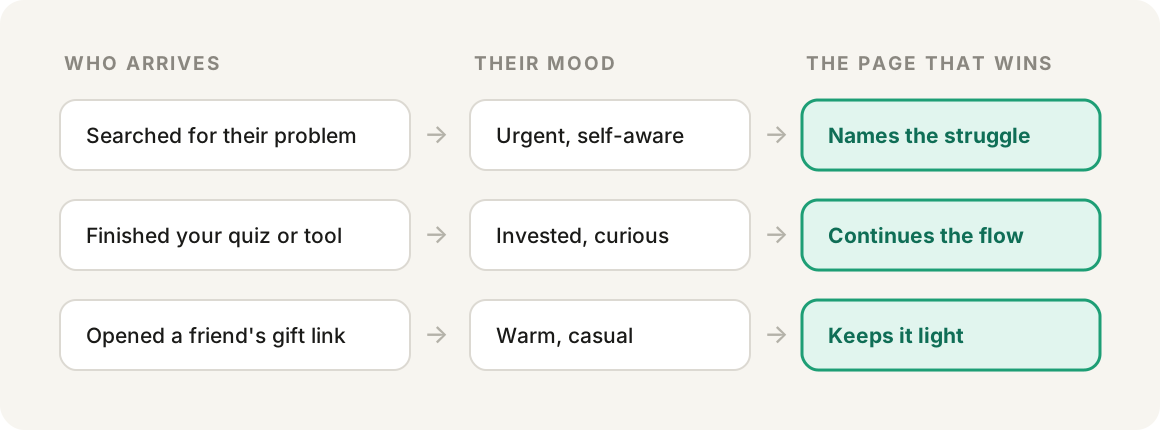
Our 2.9× page is the middle row: it picks up people right after they finish an interactive feature on our site and reads like the next step. Our 0.5× page mixed up rows one and three — casual visitors greeted with the intense vocabulary that converts our highest-intent audience.
List your top traffic sources and write down what each person just did before tapping through. Any source where your listing's tone clashes with that moment is a candidate page.
Link to this headingThe build, in four steps

Clone, don't design. Your screenshots already live somewhere editable (ours are Figma frames). Duplicate the set, keep every layout and mockup, change only the words.
Audit against a ban list. Decide which words this audience must never see, then check every text layer. Ours caught six leftovers a human eye had skimmed past, including words used as decorative graphics and a customer quote.
Show the result, not the form. One of our frames promised a daily personalized output but pictured the input form that generates it. We captured the real output in the iOS simulator instead (cmd+S saves at native App Store resolution). Scan your set for the same mismatch.
Ship and wire. Create the page in App Store Connect (the ppid appears in the URL immediately), upload, submit for review, then add the ID to wherever your store links are built — guarded, so an unapproved ID falls back to your existing link.
Link to this headingThe prompt
What I'd hand an agent to do it again. The interview section matters most: the context it collects is what separates the 2.9× page from the 0.5× one.
The full prompt (interview, build, ship, wire, measure)
# Build a custom product page for [app]

## First, interview me. Ask everything in one batch:
1. Which traffic source is this page for, and what did that
   person just do before tapping through? What mood are they
   in? (One page per intent. A page for everyone is the
   default listing again.)
2. What words convert our existing audience but would repel
   this one? These become banned vocabulary for the audit.
3. Where do our current App Store screenshots live? (Figma
   file, exported PNGs, whatever exists. We are cloning, not
   redesigning.)
4. Which app screens can back up each promise this page will
   make? List real surfaces only. A screenshot that
   overpromises converts well and churns fast.
5. Which of our (up to 70) CPPs already exist, and what does
   each serve? Avoid duplicates, and note which page currently
   receives the traffic we are about to redirect.
6. Where is the store link generated in our codebase, and is
   there routing logic to update once this page has an ID?
7. What numbers do I know cold (weekly installs, ratings
   count, active subscribers)? Sanity-check anything you
   report against these before showing it to me.

## Build
- Clone the existing screenshot set. Keep every layout, mockup,
  and background. Rewrite text layers only.
- Audit every text layer against the banned list, including
  review quotes and words used as decorative graphics. Report
  every hit before fixing.
- If a headline promises a result but the capture shows the
  tool that produces it, flag the mismatch. Capture the real
  output screen in the simulator (native resolution) rather
  than mocking one up.
- Match the existing set's frame count, naming convention, and
  export dimensions. Check the dimensions your App Store
  Connect slots actually accept before exporting; the hint
  text on an empty slot is not always the full story.

## Ship
- Create the page in App Store Connect under Growth &
  Marketing → Custom Product Pages. The page ID appears in the
  URL immediately, before screenshots are uploaded.
- Upload the set. Reuse the existing iPad screenshots if this
  page's audience is overwhelmingly phone traffic.
- Only assign search keywords if this page should replace the
  default listing in App Store search for those terms, and
  only where the keyword intent matches the page. Keyword
  combinations must be unique across pages. For pages fed by
  a direct link, skip keywords entirely.
- Consider a deep link (iOS 18+) if the page promises a
  specific in-app destination.
- Write promotional text in the same register as the new
  screenshots, not the default listing's register.
- Submit for review. Nothing serves until Apple approves, and
  review is independent of app releases.

## Wire
- Add the page ID to wherever store links are built. Guard it:
  the custom URL only works on the platform it belongs to, and
  an unapproved ID should fall back to the existing link so
  shipping early is a no-op rather than a break.
- Confirm the change is deployed by checking the served
  bundle, not just the merged code.

## Measure (repeat weekly)
- From App Store Connect: each page's views and downloads,
  plus app-wide totals. Never read totals off the Overview
  tiles; use the report with an explicit Total row.
- Derive the default-page baseline: (total downloads − CPP
  downloads) ÷ (total views − CPP views).
- Report each page as a multiple of that baseline. Flag
  anything under 1× and recommend rerouting its traffic.
- Cross-check page views against your own click events. If
  site clicks far exceed page views, the routing is broken
  even though the page exists.
- Check per-page retention and proceeds per paying user in
  App Analytics, not just conversion. A page can lift installs
  and quietly halve day-7 retention.
- State sample sizes. Small pages need weeks of data, not
  days. Recommend pausing a page only after it has been below
  1× on a real sample.
Link to this headingFAQ
How many custom product pages can I have? 70 per app.
Do they need App Review? Yes, each page's metadata is reviewed — but independently of app updates, so no new binary and no version release.
Can a CPP have a different icon, name, or price? No. Screenshots, app previews, and promotional text only.
Do CPPs show up in App Store search? Only if you assign keywords to the page. Then it appears for those terms instead of your default listing. Link-fed pages don't need keywords.
Can I use them with Apple Ads? Yes — search results ad variations, Search tab, and Today tab placements can each target a CPP. Apple's case studies attribute conversion lifts of 20–33% to this.
Can they deep link into the app? Yes, one deep link per page on iOS 18 / iPadOS 18 and later.
Is there an Android equivalent? Google Play's custom store listings, which work on similar principles.
What's a good result? Apple's average is a 2.5 percentage point lift over a 1.6% default baseline. Our matched pages run 2.4–2.9× baseline. If a page runs under 1×, it's costing you installs — measure before you scale it.
The measurement loop is the part people skip, and it's why our 0.5× page ran for a while before anyone noticed. If you already run CPPs, go compute your baseline today. Twenty minutes, and there's a decent chance one of your pages is quietly below 1×.
Running CPPs yourself? I'd like to compare notes on X (formerly Twitter) or LinkedIn.